

Are You Ready to Create Online Courses?
If you’ve ever considered adding online courses to your website but felt overwhelmed by the technical side of things, you’re not alone. Many business owners assume that creating online courses requires complicated software, expensive platforms, or advanced technical skills. The good news? That’s simply not the case — especially if you already have a WordPress website.
Learning how to create online courses can open up an entirely new income stream for your business while also helping you build authority, grow your audience, and improve your search engine rankings. Whether you’re a coach, consultant, service provider, or educator, online courses can work beautifully alongside your existing offers.
I promise you, it can be a lot easier to set up than you think (as you don't need to learn yet another system). Likewise, it can be much easier for your clients/students to remain in one place and can be far more budget-friendly.
Create Online Courses on WordPress
One of the biggest advantages of using your own website to create online courses is control. You own your content, your customer data, and the entire user experience. You’re not at the mercy of third-party platforms changing their rules, increasing fees, or limiting your branding options. Everything lives under your digital roof.
So how do you create online courses with WordPress?
There are quite a few options available on WordPress to create online courses. WordPress doesn't have a built-in feature to create online courses, as it's just open source software, so every bit of functionality is added through plugins.
This flexibility is actually one of WordPress’s biggest strengths. You’re not locked into a single way of doing things. Instead, you can choose the tools that best suit your business, your budget, and your technical comfort level.
And, there are quite a few online course plugins for WordPress (often called LMS plugins), such as Lifter LMS, MembersPress (which has membership sites and its newer online course function) and Learndash.
There are loads of others, but I find these to be the most popular ones. Now, out of these three, Learndash is definitely my favourite.
Why?
I find it is the simplest to use, with the most features. And let's face it, if you want to create online courses for your website, these have to be paramount requirements! It really does provide great scope to develop and create online courses for your business.
One of the reasons Learndash stands out is its flexibility. You can create simple courses with just a few lessons, or complex training programmes with modules, topics, quizzes, and certificates. It works just as well for beginners as it does for more advanced course creators who want to scale their offerings over time.
It's that easy!
Create Online Courses with LearnDash
With any of these plugins, once installed, they require a bit of setting up. Then, of course, it's just a question of creating the courses. I find MemberPress courses a bit more of a faff to set up, regarding protection, because each course page needs rules.
With Learndash, once set up, its simple to create online courses. You begin with adding your lesson and topic titles, then creating the content on those, the same way that you would for all the other pages on your website. Protection to all those pages are automatic on registration to the course.
This is a huge time-saver and removes a lot of the frustration that can come with course creation. When you create online courses this way, you can focus on what really matters — your content and your students — rather than getting bogged down in technical admin.
You can use the inbuilt payment system or an alternative ecommerce system such as Woocommerce or Studiocart.
This flexibility means you can sell courses as one-off purchases, bundles, or even recurring memberships. You can also integrate upsells, order bumps, and special offers, making your online courses a powerful part of your overall sales funnel.

And There's More!
There are also extra features that you can add when you create online courses. These include quizzes and assignments to test your students' knowledge, gamification to encourage students to learn like leader boards, and the ability to track their progress, as well as certificates you can create for their course completion.
These features don’t just enhance the learning experience — they also increase engagement. When students feel motivated and can clearly see their progress, they’re far more likely to complete your course and leave positive feedback or testimonials.
These are all easy to set up, too and add extra interaction for your students, which is great for SEO.
Similarly, you can also use various medias to teach your content. For example, video, text, audio and downloadable PDFs.
This variety caters to different learning styles and makes your course content far more accessible. Some students prefer watching videos, while others like reading or listening on the go. When you create online courses with mixed media, you’re giving your students the best chance of success.

Great for SEO
As I mentioned, when you create online courses with WordPress, it also helps to push you up the rankings in the search engines. How? Well, when students are logging in and spending time on your site, the search engines can see an increase in traffic, as well as time spent on your website. This is all perfect for influencing positive SEO results.
For this reason, I always try to keep as much as I can on my website. This includes online courses and purchases etc. This is perfect for keeping visitors on my website for as long as possible, and they experience the whole flow without having to leave.
Over time, this builds trust with both your audience and search engines. You’re not just publishing content — you’re creating a full ecosystem that encourages repeat visits, longer sessions, and deeper engagement.
(This is an affiliate link)
My LearnDash Training Course
If you would like to know more about how to create online courses with WordPress and Learndash then I have the perfect solution for you!
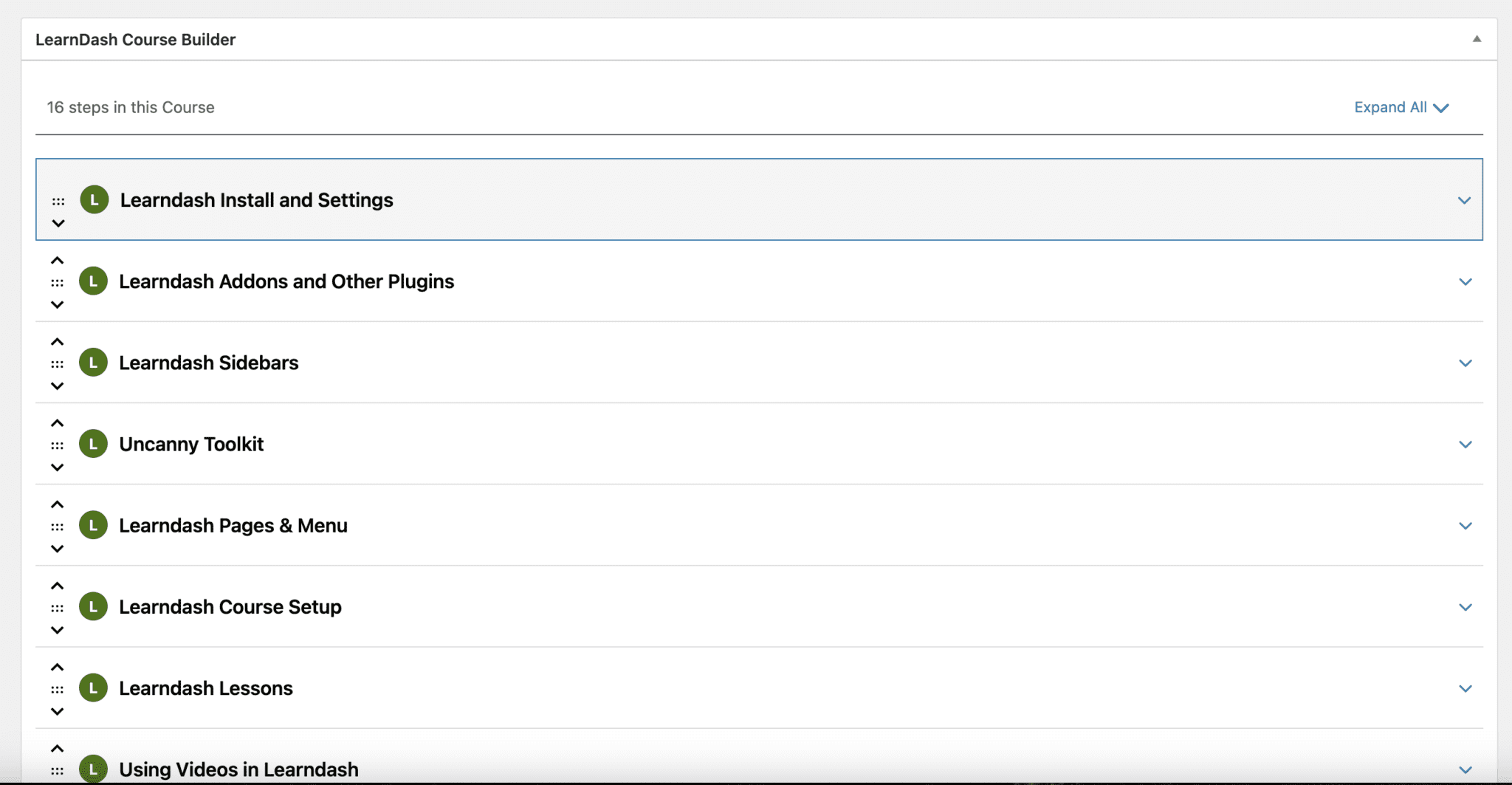
My Learndash course teaches you how to do everything from installing the plugin and setting it up to creating your courses, lessons and topics, using video and adding extra features.
You can find out more by clicking the lovely blue button below:

Expert Website Help for Growth: What Works and What Doesn’t
Expert Website Help for Growth: What Works and What Doesn't Whether you’re building your very first website or you already have one that just isn’t performing, the truth is the same: A website can grow your business… or quietly hold it back. Most people think the...

Online Course Content: 5 Simple Steps on How To Create One
What is online course content? Online course content is everything that makes up the learning experience in a digital class. It includes the videos, readings, quizzes, assignments, slides, and downloadable resources that guide someone through a topic from start to...

Online course platforms: Which are easily the best to use?
If you’re planning to build and sell a course online, you’ve probably noticed there are countless online course platforms out there. From all-in-one hosted tools to marketplaces and LMS software, the options can feel overwhelming. But if you’re already using...


